
Minimum Deposit, UPI And Other Ways To Add Money On Maan Win
A Maan Win deposit starts at ₹100 through UPI, and the money usually reaches your Wallet within 1 to 5 minutes. You can also add money with USDT, starting from 10 USDT. Both methods are on the Deposit page inside your account.

This section covers the precise steps, the limit for every method, the deposit offers listed on the page, and the action to take if money is debited from your bank but your Balance does not reflect it. Small slips cause most deposit issues, like editing the amount or scanning an outdated QR code, and you can easily avoid them.
How A Maan Win Deposit Works
The Deposit page on Maan Win shows your Cash Balance, your Withdrawable amount, the payment methods and the amount limits. You pick a method, choose an amount, and the platform gives you a fresh payment screen for that one Maan Win deposit transaction.
When you pay with UPI, you scan a new QR code or pay to the details shown, using any UPI app such as PhonePe, Google Pay or Paytm. The system matches your Maan Win deposit payment to your account using the exact amount and that one-time payment link. This is why the amount must not be changed and why old QR details must never be reused.
Once the payment is matched, the money appears in your Wallet, usually in 1 to 5 minutes. You can check it on the Deposit page or in Balance Record inside your account. If you have not yet created an account, open Maan Win first and set it up with your +91 mobile number.
Steps To Add Money On Maan Win
Sign in using your +91 mobile number and password, and then go through the steps below for your Maan Win deposit in the given sequence. Following this sequence helps you avoid most failed or missing payments.
Tap Deposit from your Wallet or account area and look at the amount limits shown at the top.
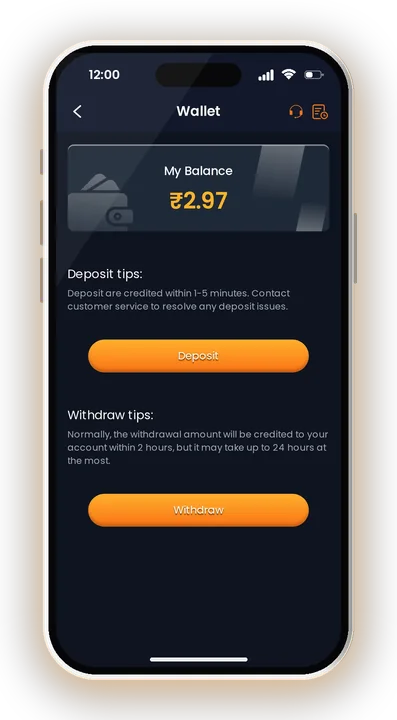
Note your Cash Balance and Withdrawable amount, and check the current limit for the method you want.
Select UPI to pay from any UPI app, or USDT if you hold crypto.
Tap an amount tile or enter your own amount within the limit. Some tiles show an extra bonus.
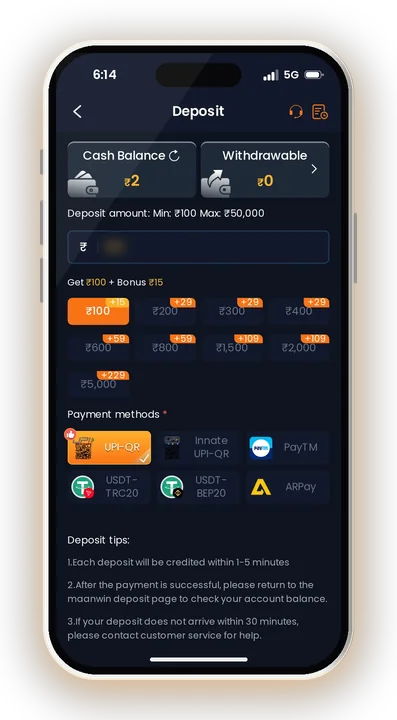
Do not round it up or down. A changed amount may not match your account.
Scan the fresh QR or details for this payment. Never pay to an old QR saved in your gallery.
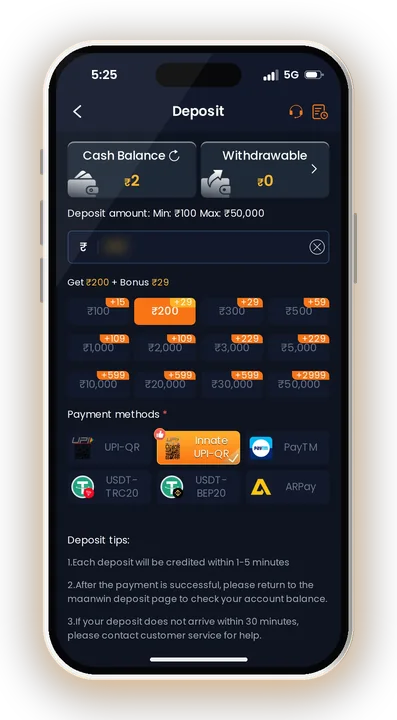
Once the payment is done, return to the Maan Win deposit page and see if your balance shows the new amount.
Take a screenshot of the success screen with the UTR or transaction ID. You will need it if the money is late.
New players often close the app right after paying in their UPI app. It is better to come back to the Deposit page so the platform shows you the result, and so you know whether to wait or to raise a complaint.
Maan Win Deposit Limits Per Method
Each method has its own minimum and maximum. The general Deposit page shows Min: ₹100 and Max: ₹50,000 for rupee payments on the Maan Win deposit screen.
| Method | Minimum | Maximum | Usual credit time |
|---|---|---|---|
| UPI | ₹100 | ₹50,000 | 1-5 minutes |
| USDT | 10 USDT | 100000 USDT | 1-5 minutes |
To deposit above ₹50,000 via UPI, divide the sum into several payments, and use a fresh QR code for each one. Since limits may change, look at the Deposit page for the latest limit before paying.
Remember that a deposit and a withdrawal have different limits. The minimum to withdraw is ₹110 for UPI, so a ₹100 deposit alone will not be enough to request a withdrawal later. For timings and rules on taking money out, read Maan Win Withdrawal.
UPI And USDT: Which Method Suits You
Both methods credit in the same 1 to 5 minutes, so the choice for your Maan Win deposit depends on what you already use. Here is how they differ in practice.
Paying With UPI
For most players in India, UPI is the easiest option. Any UPI app works, including PhonePe, Google Pay or Paytm, and a deposit can begin from only ₹100.
The Deposit page may show different QR options, but they are all the same UPI payment. Pick any one that is open, scan it once, and do not reuse it for a second payment.
Paying With USDT
USDT suits players who already hold crypto in a wallet. The minimum is 10 USDT and the maximum is 100000 USDT.
Copy the deposit address carefully from the payment screen and use the network named there. A crypto transfer sent to a wrong address or wrong network usually cannot be reversed, so double-check before you confirm.
Linking The Same Methods For Withdrawal
UPI and USDT can also be added as withdrawal accounts later. Using a UPI ID or USDT address in your own name keeps your records clean when you take money out.
Deposit Bonus Offers On The Deposit Page
Some amount tiles on the Deposit page carry an extra bonus on the Maan Win deposit screen. Offers shown include Get ₹100 + Bonus ₹15, Get ₹200 + Bonus ₹29 and Get ₹20,600 + Bonus ₹599. Some UPI tiles also show a ₹29 bonus.
Before you pick a bigger tile just for the bonus, ask yourself whether that amount fits your playing budget. A ₹15 extra on ₹100 is a small benefit, not a reason to make a Maan Win deposit larger than you planned.
Other rewards sit in the Promo and bonus areas next to the Maan Win deposit page, including Daily Check in, Deposit Wheel, Coupons, Gifts, Earn Now tasks and Super Jackpot rules. Read the terms for each one, because bonus money may have conditions before it becomes Withdrawable.
What To Do When Money Does Not Reach Your Wallet
Most deposits arrive within 1 to 5 minutes. If yours has not, follow these checks in order instead of paying again.
Wait And Check Your Bank First
Open your UPI app and confirm the payment shows as successful, not pending or failed. A pending UPI payment often settles on its own, and a failed one is usually refunded by your bank.
Then check Balance Record in your account. Sometimes the money is already there and only the screen has not refreshed.
Contact Customer Care After 30 Minutes
If 30 minutes have passed and your Balance has not changed, contact Customer Care. Use Live Support, or open the Self Service Center and choose the Deposit Not Received form.
Attach your payment screenshot with the UTR or transaction ID, the amount and the time. Clear proof is what gets a complaint solved fastest.
Track Your Complaint
After you submit a work order, use Progress Query to see the review result. Do not send the same complaint many times, and do not make a second payment to “push” the first one.
Common Mistakes That Cause Missing Deposits
Changing the amount, scanning an old QR code and paying twice to the same QR are the usual reasons a payment cannot be matched. Paying from a screenshot of an old QR is the most common one, so always use the screen that opens for each new deposit.
Smart Money Tips Before Your Maan Win Deposit
A Maan Win deposit is real money you may lose. Results in WinGo, Aviator, slots and other games are random, and no method gives a sure result.
- Play only if you are 18+: Play on the platform only when you are at least 18 years old and your state permits real-money games. Laws vary across states, so please verify the rules where you live.
- Fix a daily playing budget: Fix an amount before opening the app, and quit once you have spent it. Keeping small deposits inside that budget makes it simpler to stay in control.
- Do not chase losses: Adding money again right after a loss usually makes things worse. Take a break instead.
- Keep one account: Avoid duplicate accounts. Use one number, one account and payment methods in your own name.
- Protect your phone: Never let a shared phone remember your password, as anybody holding the device could get into your Wallet.
- Do not promise profit: If you share your invite code, never tell friends they will earn money by playing.
Safety: Fake Links, Hacks And Payment Scams
Pay only through the Deposit page inside your own account for any Maan Win deposit. Never send money to a UPI ID or QR code shared by a stranger on Telegram or WhatsApp, even if they claim to be support or an agent.
There is no Maan Win Hack. Hack, predictor or signal apps that claim to know the next WinGo colour or Aviator result are scams. They often ask you to make a Maan Win deposit through their link or pay a fee, and then disappear.
Install the Maan Win App only from the official link, and log in with the same account you already use. If you are new, you can start with Maan Win Register, or see the full sign-up steps in Maan Win Register using invite code PUWFKWN.
Maan Win Deposit – FAQs
What is the minimum deposit on Maan Win?
The minimum is ₹100 for UPI and 10 USDT for USDT. The UPI maximum per payment is ₹50,000.
How long does a Maan Win deposit take?
Normally the money shows up in your Wallet within 1 to 5 minutes. If 30 minutes pass and it is still missing, reach out to Customer Care and share your payment proof.
Can I reuse the same QR code for my next deposit?
No. Each deposit opens a new QR code or payment details. Reusing an old QR code is a common reason money does not show in your Balance.
Is there a bonus when I add money?
Some amount tiles show offers such as Get ₹100 + Bonus ₹15 or Get ₹200 + Bonus ₹29. Check the Deposit page for the offers open right now.
Summing Up
Adding money on Maan Win is quick when you follow the steps: check the limits, pay the exact amount, use only the fresh QR code and keep your payment proof. UPI starts at ₹100, USDT at 10 USDT, and both usually credit in 1 to 5 minutes.
If a payment goes missing, wait 30 minutes, then use Live Support or the Deposit Not Received form. Play only if you are 18+, keep to a fixed budget, and remember that game results are uncertain.